1. Log into your SiteWorx account. (eg: www.example.com:2443/siteworx/ )
2. Under SiteWorx Menu, click the Hosting Features menu item if it is not already open.
3. Click the Domain menu item and then click on the Subdomain option.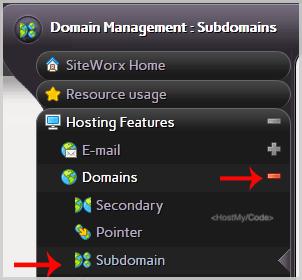
4. Under the "Add a Subdomain" tab, enter your subdomain name in the Subdomain field.
5. Click on the Add button.
Gli articoli più popolari
How to Remove a Subdomain in SiteWorx?
1. Log into your SiteWorx account. (e.g.: www.example.com:2443/siteworx/ )2. Under SiteWorx Menu,...
How to Add a Secondary Domains in SiteWorx?
Before adding a secondary domain name, we advise you to point your add-on domain name server to...
How to Remove Secondary Domains in SiteWorx?
1. Log into your SiteWorx account. (eg: www.example.com:2443/siteworx/ )2. Under SiteWorx Menu,...