1. Log into your cPanel account.
2. In the Domains section, click on Subdomains Icon.

3. Under the Modify a Subdomain list you can see a list of subdomains.
4. Click the Manage Redirection link that corresponds to the subdomain that you wish to manage.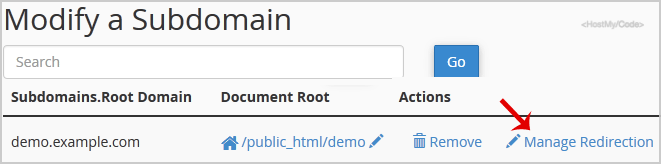
5. Under the Subdomain Redirection option, you should enter the link to which you want to redirect the subdomain in the available text box.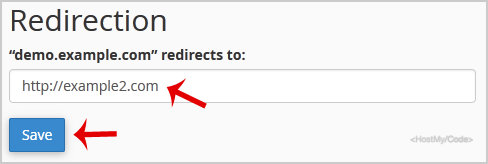
熱門文章
How to Create a Subdomain in cPanel?
1. Log into your cPanel account.2. In the Domains section, click on Subdomains Icon. 3. Under...
How to Park a Domain in cPanel?
Note: Before parking a domain, First you need to update name server of your domain you want to...
How to Remove Parked Domain name in cPanel?
1. Log into your cPanel account. 2. In the Domains section, click on Parked Domains Icon. 3....
How to Create Addon Domains?
Before adding an Addon Domain name, you need to point your addon domain name server to your main...
How to Remove an Add-on Domain?
1. Log into your cPanel account. 2. In the Domains section, click on the Addon Domains icon.3....